
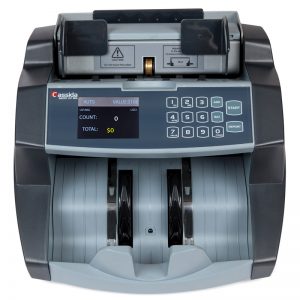
PRODUCT SPECIFICATIONS
Type: Business-Grade Bill Counter with ValuCount™
Loading Style: Top
Display: 2.8″ TFT Screen
Recognizes Denominations: No
Counting Speed: 1,400 Bills per minute
Hopper Capacity: 400 bills (uncirculated)
Stacker Capacity: 300 bills (uncirculated)
Unit Weight: 10.8 lbs (10kg)
Unit Dimensions (L x W x H): 11″ x 10.2″ x 8.1″
Models Available: UV, UV/MG
Modes: Count, Batch, Add, Add+Batch
On-screen Report: Yes
Allows Print: Yes
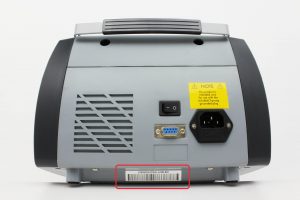
Your serial number is a string of numbers and letters unique to your unit located underside of your unit.


We at Cassida suggest performing weekly cleaning on the unit to maintain top performance.
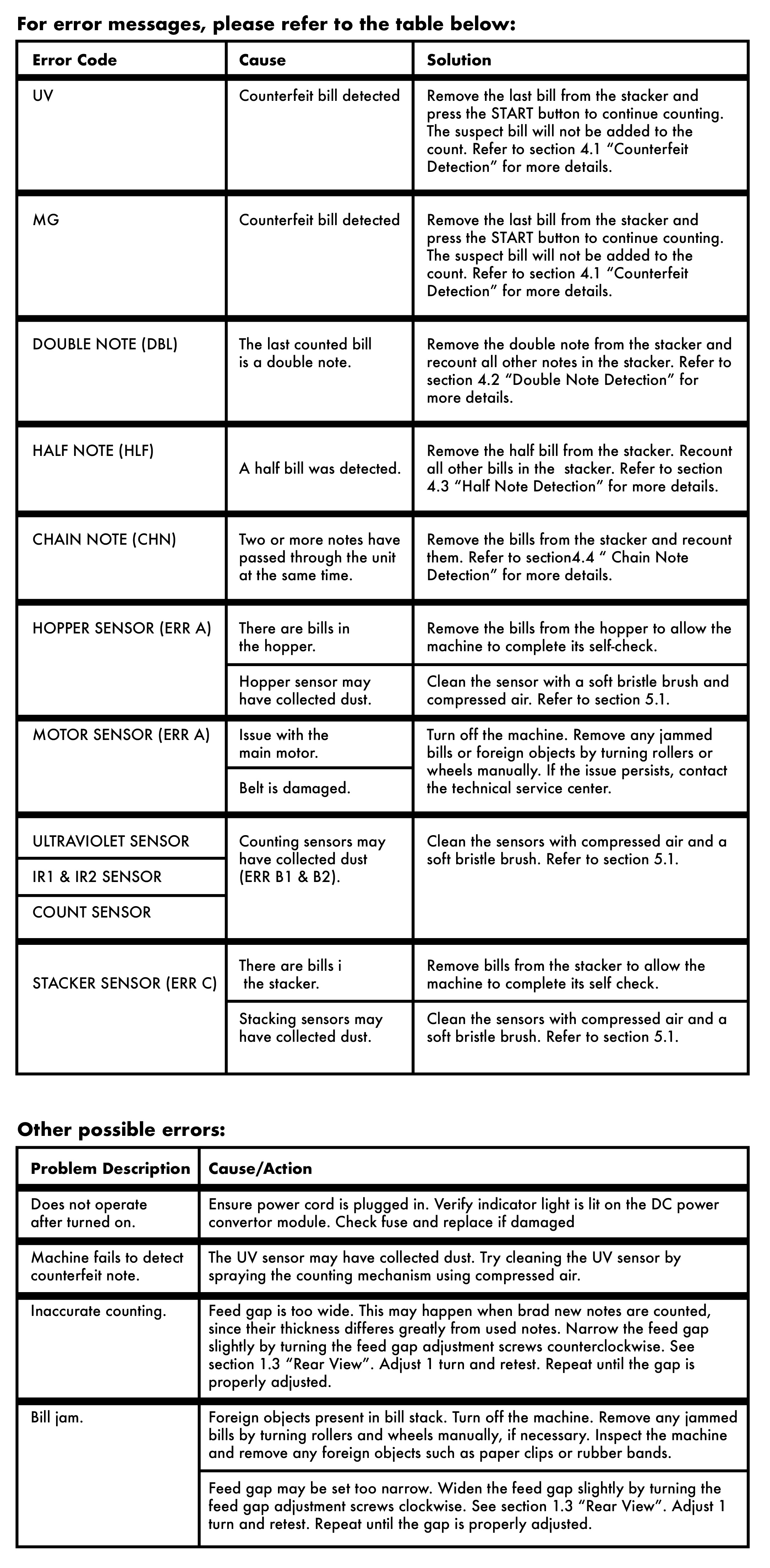
The Cassida 6600 is designed to detect and flag any suspected counterfeit notes. This unit provides Ultraviolet (UV), and Magnetic (MG) (MG available on certain model)
There are main counterfeit detection techniques used in the majority of discriminators and detectors:
- MG – Magnetic Feature Detection – US currency uses specific magnetic ink at exact locations to provide a unique magnetic signature on each denomination note. By scanning each bill for the presence and location of these features, the 6600 is capable of detection the minute magnetic signals present on these bills and will flag any notes that do not have these features present, in the correct locations. Certain counterfeit notes do not have the same features and will be rejected by the Signature as ‘SUSPECT’
- UV – Ultraviolet Feature Detection – Certain features are hidden to the naked eye on all US currency. In order to detect these features, the 6600 has special ultraviolet emitters and sensors capable of detecting the exact ultraviolet anti-counterfeit features built into each denomination note. These are referenced against known-genuine currency and used to flag any notes that do not display the correct UV features on the suspect notes.
- There are a few reasons that a detector may flag genuine currency as suspect. If bills are worn, bent, torn, or crumpled, the anti-counterfeit features needed to verify a bill as genuine may be compromised. For example, the magnetic ink on a note may wear over time or heavy use, reducing the magnetic response to below detection thresholds. If the 6600 cannot verify the correct features expected on a note, the unit will flag that currency as ‘SUSPECT’.
- If sensors are dirty or damaged, the 6600 will not be able to detect the necessary anti-counterfeit features needed to verify currency as genuine.
- Another possible reason is that the detection sensors may be incorrectly calibrated, lost reference, or be under operating conditions that cause false positives. In order to reduce these error types, it is advised to operate the unit out of direct sunlight and reduce interference that may cause sensor errors. If this occurs frequently under normal operation, please contact Cassida Technical Support for troubleshooting or service.
- One of the most common reasons for miscounting is improper bill loading. In most cases the 6600 will display an error message with clear instructions on how to resolve the issue and reload the currency.
- The second most common reason of miscounting is poor maintenance of the unit. Each sensor needs to be cleaned and free of any debris to operate correctly. Due to the complexity of the sensing mechanisms, the unit must be able to sense all features which are expected on genuine currency. SUSPECT errors may occur if sensors are obscured.
- In rare cases, electromechanical failure of the unit will cause all notes to be sensed incorrectly. For frequesnt, repeatable improper denomination errors, please contact Cassida Technical Support for repair.
Depending on the mode the unit is set to, the number of rejects may vary greatly. For example, in sort mode of a highly mixed stack of notes, ALL notes which do not match the first bill passed through the unit will be rejected. Another example is FACE mode, where all notes which the same face up on the first note through the unit will be rejected.
No, the 6600 does not sort bills, it only counts.
No, the 6600 does not recognize note value automatically, but with ValuCount, you can manually select the denomination you want counted and it will tally the number of bills as well as give the total value amount counted.
ValuCount is a special feature on the 6600 that allows you to calculate the monetary value of a selected denomination.
- By pressing the “Value” button you can cycle through and select your desired counting denomination.
- No, the Cassida 6600 is a high end bill counter that can be set to recognize a specific denominations through ValuCount.
- UV Model: Unit that utilizes Ultraviolet (UV) to catch suspect counterfeit bills.
- UV/MG Model: Unit that utilizes Ultraviolet (UV) and Magnetic (MG) technology to catch suspect counterfeit bills.
- For warranty information, please visit:
- To activate your warranty in the US or Canada, please register your product online by visiting
- In other countries, go to www.CassidaGlobal.com/register
In most cases, the malfunction of machine can be resolved by cleaning the unit. Please refer to the question “How do I clean my unit and how often does it need to be cleaned?”
- Contact Cassida Support through our webpage at: www.CassidaUSA.com/support-contact and create a support ticket.
- The customer service representative assigned to your ticket will respond with troubleshooting techniques, or arrange for an on-site repair at our facility.
Please visit www.CassidaUSA.com/support-contact to create a support ticket
If you cannot find the support topic you need, please contact our customer service.